 |
HTMLPRINTER
2.13.5-1
|
|
HTMLPRINTER
2.13.5-1
|
This guide provides information on the usage of the ADK Printer system.
This document is intended for programmers that want to understand and use the ADK Printer system.
This guide is organized as follows:
Chapter 1, Overview: Provides an overview of the ADK Printer system.
Chapter 2, Migrating from Version 1.x to 2.x: Contains notes when switching from version 1.x to 2.x.
Chapter 3, Programming: Describes the necessary components to run the ADK Printer system.
Chapter 4, Printer Viewer: Contains information on the PrinterViewer.
Chapter 5, Getting Started: Contains helpful information to help you get started with using the ADK Printer system.
Chapter 6, Troubleshooting: Presents troubleshooting guidelines on various ADK Printer system issues.
The following are the hardware and software requirements of the ADK Printer system.
The HTMLPrinter system is designed to be platform agnostic and will be supported on V/OS, Raptor, and Verix terminals.
On V/OS HTMLPrinter requires installation of corresponding platform packages. The system needs to provide dependent libraries (libfreetype, libpng, libjpg, libungif). For details please refer to release notes.
On Verix eVo the dependent libraries are statically linked against the print server so that no additional libraries need to be installed to make the binary runnable. Client has to link additional libraries, which are required by libvfiprt and libvfiguiprt. For more details please refer to chapters HTMLPrinter Running on V/OS and Running on Verix.
For installation of appropriate fonts on both platforms please refer to Example: Receipt HTML Resource File and Example: Asynchronous Printing.
Merging GUI and printer into one server resulted in minor changes in the interface. Check Chapter 3 for more information.
Please refer to Table 2 for the acronyms used in this manual.
Table: Acronym Definitions
| Acronym | Definitions |
|---|---|
| ADK | Application Development Kit |
| API | Application Program Interface |
| CSS | Cascading Style Sheet |
| DB | Database |
| HTML | HyperText Markup Language |
| OOM | Out of Memory |
| OS | Operating System |
| XLFD | X Logical Font Description |
This chapter contains an overview of the ADK Printer system.
The ADK Printer component allows applications to define printer receipts with the help of HTML documents. This includes standard HTML support for static text, fonts, tables, and images. Some non-HTML printout elements like barcodes and QR codes are specified using XML processing syntax.
Interactive HTML elements like input fields, buttons, etc. are not supported for printing for obvious reasons.
The application programming interface allows printer requests to start given the URL of the receipt definition HTML document and the relevant parameter for variable data definitions in the HTML document.
In addition, specific APIs are provided for getting printer status and information and setting printer parameters such as the printer contrast.
During printing, the HTML document gets rendered and the resulting image data is sent to the printer. The internal printer interface support various printer models.
There is limited support for printing to printers that only support text printing. A set of escape sequences is supported for use with these printers allowing to use double width / height printing and activating italic, bold, and underlined printing.
In addition to printing, ADK Printer converts HTML documents to PNG images and text strings.
This chapter contains notes when switching from version 1.x to 2.x.
When creating new applications, this chapter can be skipped.
Merging GUI and printer into one server to save memory resulted in minor compatibility issues. Therefore, when switching to version 2.x, some changes will have to be applied to the source code:
#include “html/prt.h” has to be used instead of #include “prt/prt.h”.vfihtml. This new namespace is automatically referenced by vfigui and vfiprt. In most cases, no action is required.libvfiprt has been replaced by libvfiguiprt which is the common client library for GUI and printer.This chapter describes the necessary components to run the ADK Printer system.
The ADK Printer system is intended to run across the entire hardware portfolio. Currently, support is provided for the following hardware with on-board or external printers.
Table: Supported Hardware
| OS | Hardware | Printer |
|---|---|---|
| V/OS | VX 520 | On-board printer |
| V/OS | VX 520C | On-board printer |
| V/OS | UX external printers | Custom printer TG2460 (experimental with USB) |
| V/OS | VX 675 | On-board printer |
| Verix | eVo VX 520 | On-board printer |
| Verix | eVo VX 520C | On-board printer |
| Verix | eVo VX 675 | On-board printer |
| Verix | eVo VX 680 | On-board printer |
| Verix | eVo VX 690 | On-board printer |
| Verix | eVo VX 820 | DUET External printer (base station) |
| Raptor | V200 | On-board printer |
| H5000 | H5000 | On-board printer |
The ADK Printer system is provided as a service with a standalone server module and a corresponding client library to link with applications. It provides a header file (prt.h) that exports the API function calls.
The ADK Printer system is composed of the following deliveries:
Table: ADK Printer Deliveries
| File | Purpose |
|---|---|
prt.h | Printer system header file with exported definitions, functions, etc. |
libvfiprt | Printer system client library |
prtserver | Printer server binary |
libvfiguiprt | Combined GUI and printer client library |
guiprtserver | Combined GUI and printer server |
When using both GUI and printer it is recommended to use guiprtserver over running prtserver and guiserver as separate processes for saving memory.
Verix requires following additional libraries:
Table: Required Libraries
| File | Purpose |
|---|---|
libposix | libvfiprt requires some POSIX functions (e.g. pthread) that are not provided by Verix OS and emulated by this library. |
On V/OS, the ADK Printer service runs as a separate process with privileged rights to access HTML and graphical resource files accompanied with the applications. Different applications typically run in separate user spaces. On Verix, the ADK Printer service runs as a separate task. Usually in the same group as the client application task, which allows the ADK Printer service to access the HTML and resource files.
Applications link with the ADK Printer client library to access the API functions. They can either pass a URL to the HTML resource files or send HTML documents directly. In addition, they pass dynamic data over the inter-process interface into the ADK Printer service.
The printer server needs to be started with the corresponding platform mechanisms prior to any application use. Please note that there is no automatic restart of the printer server in case of crashes.
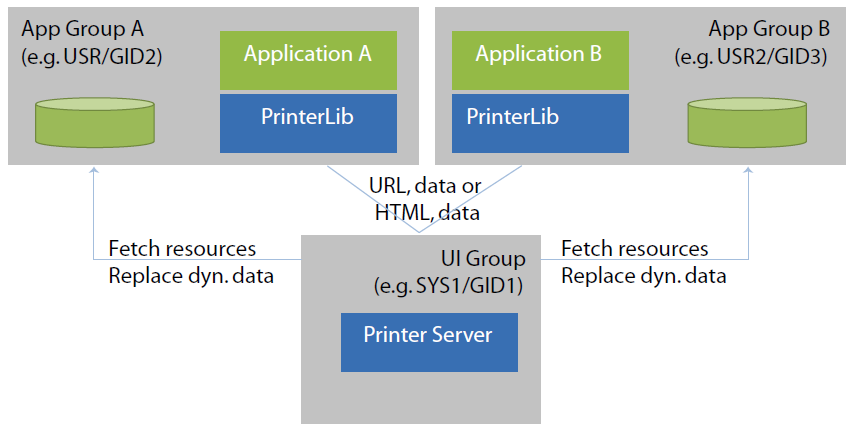
The printer server and client library use the environment variable LPD to control the port used for communication between the two entities. The content is hostname:port-offset. The base for the offset is 5950. The default for the hostname is localhost. The overall default is “:0”.
The printer server binds to the configured IP address (i.e. if set to localhost, the printer server can only be accessed internally). For external access, the hostname must match the IP address of the device.
Examples:
On V/OS, ADK Printer supports both internal (e.g. VX 520) and external (TG2460) printers. If an external printer is detected, it is preferred over the internal one. The presence of an external printer is tested by checking if the device /dev/lp0 exists. When a TG2460 printer is connected via USB, /dev/lp0 is set up and when disconnected, it is removed again. The device /dev/lp0 may be switched to another device by setting the environment variable LPDEVICE to the desired value prior to starting prtserver.
ADK Printer resources describe the content and layout of printer receipts.
The following items are supported:
Resources accompany the application packages (i.e. they reside in the same user space as the related application).
HTML has no means of putting a hard limit on the width of the layout as would be required for the fixed paper width. If the minimum width of the layout exceeds the paper width, the printout will be truncated to the paper width. Normally, HTML would add scroll bars to support this, but this is not possible on the printout.
This happens when:
By default, resource files are looked up in the directory “www/print”.
“resource/print” is used.On V/OS, directory “www/print” and the application are usually located in the user’s home folder. For instance, if an application is installed on VX520 under /home/usr1, the default the resource directory is:
On Verix eVo, the default resource folder is in group 15 on drive I. For instance, if an application is installed on VX520, the default resource directory is:
The default location may be changed by using the PRT_PROP_RESOURCE_PATH property of prtSetPropertyString().
In addition, an optional prefix may be set using the PRT_PROP_FILE_PREFIX property of prtSetPropertyString(). This prefix is prepended to the file names provided for URLs and template names.
The prefix is prepended as is. If it contains one or more '/', then it will add new directory levels to the path, if not it just modifies the file name.
With prefix, the resulting file name is:
PRT_FILE_NOT_FOUND error.A limited set of standard HTML elements are used to define the layout of receipts. All unknown HTML tags are ignored and text without HTML formatting is displayed.
The following HTML tags are supported:
| Attribute | Description |
|---|---|
| - | - |
| Attribute | Description |
|---|---|
| dir | direction (rtl, ltr or auto) |
| Attribute | Description |
|---|---|
| dir | direction (rtl, ltr or auto) |
| Attribute | Description |
|---|---|
| - | - |
| Attribute | Description |
|---|---|
| style | inline CSS style |
| Attribute | Description |
|---|---|
| name | name |
| style | inline CSS style |
| Attribute | Description |
|---|---|
| dir | direction (rtl, ltr or auto) |
| name | name |
| style | inline CSS style |
| Attribute | Description |
|---|---|
| - | - |
| Attribute | Description |
|---|---|
| size | Font size |
| face | Font face (helvetica, courier, times) |
| color | Text color |
| Attribute | Description |
|---|---|
| - | - |
| Attribute | Description |
|---|---|
| - | - |
| Attribute | Description |
|---|---|
| - | - |
| Attribute | Description |
|---|---|
| src | URL of the image. |
| alt | alternate text |
| align | alignment (supported: top/middle/bottom) |
| Attribute | Description |
|---|---|
| - | - |
| Attribute | Description |
|---|---|
| type | one of 1,A,a,I,i |
| start | start value for counter |
| Attribute | Description |
|---|---|
| - | - |
| Attribute | Description |
|---|---|
| - | - |
| Attribute | Description |
|---|---|
| - | - |
| Attribute | Description |
|---|---|
| - | - |
| Attribute | Description |
|---|---|
| border | Border size |
| cellspacing | Space between cells |
| cellpadding | Additional space inside cells |
| Attribute | Description |
|---|---|
| width | |
| height | |
| colspan | Cell spans this number of columns |
| rowspan | Cell spans this number of rows |
| Attribute | Description |
|---|---|
| width | |
| height | |
| colspan | Cell spans this number of columns |
| rowspan | Cell spans this number of rows |
| Attribute | Description |
|---|---|
| - | - |
| Attribute | Description |
|---|---|
| - | - |
| Attribute | Description |
|---|---|
| - | - |
Color Names Support:
The following color names are supported: aqua, cyan, black, blue, fuchsia, magenta, gray, green, lime, maroon, navy, olive, orange, purple, red, silver, teal, white, and yellow.
Soft Hyphen Support:
Soft hyphens are used to specify a place in text where a hyphenated break is allowed without forcing a line break in an inconvenient place if the text is reflowed.
Use one of the following syntax to insert a soft hyphen.
Cascading Style Sheets (CSS) are used to change appearance of HTML elements. A limited set of CSS elements is supported only.
CSS attributes can be specified directly in the HTML documents by using the inline style attribute for HTML elements. The inline style attributes overwrite styles taken from the CSS file. PRT.INI may be used for specifying a global CSS file.
Table: Supported CSS Style Attributes
| CSS Style Attribute | Description | Limitation |
|---|---|---|
| background-color | Background color | not supported for <input> |
| background-image | Background image: url() and linear-gradient() are supported. linear-gradient() only supports gradients parallel to the x- or y-axis. | not supported for <input> |
| background-position | Background position | not supported for <input> |
| background-repeat | Supported values: no-repeat, repeat-x, repeat-y, repeat | not supported for <input> |
| background-size | Scale background image. | - |
| border border-style border-top border-right border-bottom border-left border-width border-color margin margin-left margin-top margin-right margin-bottom padding padding-left padding-top padding-right padding-bottom | Table border, margin and padding properties Single properties are also supported, e.g. border-bottom-color | - |
| border-radius border-top/bottom-left/right-radius | Border radius for creating rounded corners. | Only supported for buttons and text/password/number input fields. |
| border-image border-image-slice/width/outset | Use image for decorating the border. | - |
| border-spacing | <table> | Spacing between table cells, only px supported. |
| bottom | bottom position | - |
| color | Text color | - |
| display | Display property | Only block, inline-block and table-cell are supported |
| width | Width in px or % | - |
| height | Height in px or % | - |
| font | Set font family, style, size and weight | - |
| font-family | - | - |
| font-style | - | - |
| font-size | - | - |
| font-stretch | - | DirectGUI does not support distinguishing different variants of condensed or expanded due to FLTK limitations |
| font-weight | - | bolder and lighter are always relative to “normal” |
| left | left position | - |
| line-height | Set line height | - |
| overflow | Overflow=’visible’: The overflow is not clipped, it renders outside the element’s box (default) Overflow=’hidden’: The overflow is clipped. Overflow=’auto’: If overflow is clipped, a scroll bar should be added to see the rest of the content Overflow=’scroll’: The overflow is clipped, but a scroll bar is added to see the rest of the content Overflow=’autogrid’: Like ‘auto’ just that the scrolling snaps in at multiples of the element width/height | - |
| position | Position static, relative, absolute or fixed | - |
| right | right position | - |
| text-align | Horizontal alignment(left, center, right) | - |
| top | top position | - |
| vertical-align | Vertical alignment (top, middle, bottom) | - |
| white-space | White-space (normal, nowrap, pre-line, pre-wrap, pre) | - |
| z-index | Determines which element is shown in front if elements overlap | Only supported for block elements like e.g. <div> |
ADK Printer supports the descendant selector and child selector, sibling selectors are not supported. The following elements cannot be used as ancestor in a descendant or child selector rule:
That is the following rule is not supported
Whereas the following rule is supported
Currently the following limitations exist in ADK Printer when using CSS:
rgba(), hsl() and hsla() are not supportedGlobal CSS file: All supported CSS properties may be used in the global CSS file and work the same way as when using the style attribute. For CSS selectors the following restrictions apply:
HTML resource files may contain placeholders for dynamic data elements. These placeholders are replaced before actual HTML rendering process takes place.
The following syntax (in XML processing instruction syntax) are supported at any place in the HTML file:
| Definition | Documentation |
|---|---|
| <?var name?> | this token is replaced with the value of a name/value pair provided in the prtHTML() or prtURL() client API functions |
| <?varhtml name?> | this token is replaced with the value of a name/value pair provided in the prtHTML() or prtURL() client API functions. The value may contain HTML code. |
| <?foreach name|prefix|body|postfix?> <?foreach name|prefix|body|postfix|empty?> | This token is replaced with the content of the array found in 'name'. The array has to be JSON encoded and may contain objects with several members. The replacement works as follows: If the JSON encoded array is empty, then the token is replaced by 'empty'. If the JSON encoded array is not empty, then the token is replaced by:
|
| <?include filename?> | This token is replaced by the content of file filename. The file is looked up relative to the current file or to the resource folder when HTML was provided directly. |
| <?ifexist name body?> <?ifnexist name body?> | This token is replaced by body if the variable ‘name’ exists/does not exist in the map of name/value pairs. body may contain HTML tags with "<>" replaced by "()", e.g. use "(div)" instead of "<div>". If "(" or ")" should not be replaced, escape it using "\". |
| <?ifeq name value body?> <?ifneq name value body?> <?ifgt name value body?> <?ifge name value body?> <?iflt name value body?> <?ifle name value body?> | This token is replaced by body if comparing the content ‘s’ of the variable ‘name’ with the string ‘value’ matches according to the following rules:
|
| <?ifz name body?> <?ifn name body?> | This token is replaced by body if the variable ‘name’ is an empty (ifz) or a not empty string (ifn). If the variable does not exist in the map of name/value pairs, name is taken as an empty string. body may contain HTML tags with "<>" replaced by "()", e.g. use "(div)" instead of "<div>". If "(" or ")" should not be replaced, escape it using "\". |
| <?ifin name val1 val2 body?> | This token is replaced by body if the variable ‘name’ is within the numeric interval val1...val2. Values are treated as integers for comparison. body may contain HTML tags with "<>" replaced by "()", e.g. use "(div)" instead of "<div>". If "(" or ")" should not be replaced, escape it using "\". |
| <?ifnotin name val1 val2 body?> | This token is replaced by body if the variable ‘name’ is not within the numeric interval val1...val2. Values are treated as integers for comparison. body may contain HTML tags with "<>" replaced by "()", e.g. use "(div)" instead of "<div>". If "(" or ")" should not be replaced, escape it using "\". |
Unless <?varhtml name?> is used when inserting values, HTML special characters are escaped so that they will be displayed on screen (e.g. ‘<’ will be substituted by ‘<’). Therefore, the application does not have to take care to not break the HTML structure but is also not able to insert HTML tags via this mechanism. To dynamically insert HTML tags, <?varhtml name?> must be used instead.
Example:
The printer system supports rendering barcodes.
The barcode can be specified in the HTML files using the following XML processing instruction:
| Type | Description |
|---|---|
| inter-2/5 | INTERLEAVE 2/5 barcode |
| ean-13 | EAN-13 barcode |
| ean-8 | EAN-8 barcode |
| upc-a | UPC-A barcode |
| upc-e | UPC-E barcode |
| code-128 | code-18 barcode |
| code-128r | code-18 barcode rotated by 90 degrees (printed top to bottom) |
| aztec-x | Aztec code, x represents the symbol’s part (%)allocated for error correction words |
| aztec | Aztec code, with 23% error correction words |
| qr-l | Level L, 7% of codewords can be restored |
| qr-m | Level M, 15% of codewords can be restored |
| qr-q | Level Q, 25% of codewords can be restored |
| qr-h | Level H, 30% of codewords can be restored |
Data format:
The type and length of supported data depends on the type of the barcode (e.g. EAN-13 only supports digits). Check the corresponding standards for more information. The data is percent-encoded, i.e. special characters are escaped by “%hex”. Null bytes are currently not supported.
Example: %20 equals to a space character.
maxwidth, maxheight:
This specifies the maximum width and height (in pixel) of the generated barcode image.
Dynamic data:
To pass dynamic data for a barcode the <?barcodevar … ?> syntax has to be used. The variable name refers to an entry in the value map passed on to prtURL().
Example: EAN barcode with a maximum size of 384x60 pixels containing the data ‘4104640025303’:
ADK Printer comes with a set of different scripting processors pre-installed for handling dynamic data (e.g. <?varhtml … ?>). For more demanding applications additional libraries can be used to register a XML processors that preprocess the HTML code (e.g. for JavaScript, see chapter JavaScript support). Each script processor will be invoked for the XML processing instruction for which it has been registered. It receives the content of the XML processing instruction along with the global key value map as input. The output of the script is inserted into the HTML document. Preprocessing happens until no more XML processing instructions are found for which XML processors have been registered.
XML processing syntax is used to run scripts that generate output on the fly. All XML processing instructions have the form:
name refers to the name of the scripting language and selects the script processor to be used. If a corresponding script processor has been found, the XML processing instruction is replaced by the output of the script, which in turn can contain HTML code or new XML processing instructions. If new XML processing instructions have been generated, these will be processed in the next pass until either no XML processing instruction remains or until an internal limit is hit that is used to break infinite recursion.
Note that the script must not contain ‘?>’ as this indicates the end of the script source code and other representations need to be used if ‘?>’ is required. For example, in JavaScript ‘?>’ can be constructed by concatenating two strings “?” + “>” which eliminates the sequence ‘?>’ from the source code.
New script processors can be installed using htmlSetScriptProcessor() that takes the name of the script language and a function pointer that is invoked to process the script.
‘name’ refers to the name in the XML processing instruction (i.e. the name immediately following ‘<?’).
The script has access to the key value map supported by most dialog functions The script may write data to two strings corresponding to stdout and stderr. The data written to the first string is inserted into the document while the second is used for error reporting.
Since version 2.1.1 the XML processor for JavaScript/ECMAScript is part of standard GUIPRT distribution package. The library libjsproc is provided as static or as dynamic library as a kind of plugin for V/OS, V/OS2 and Verix platform. Following files and packages are available:
V/OS:
jsproc.h, libjsproc.a, libjsproc.so (part of development package guiprt-vos-dev-X.X.X-X.zip)dl.libjsproc-X.X.X-X.tar (part of load package guiprt-vos-load-X.X.X-X.zip)V/OS2:
jsproc.h, libjsproc.a, libjsproc.so (part of development package guiprt-vos2-dev-X.X.X-X.zip)dl.libjsproc-X.X.X-X.tar (part of load package guiprt-vos2-load-X.X.X-X.zip)Verix:
jsproc.h, libjsproc.a, libjsproc.so, libjsproc.vsl (part of development package guiprt-vrx-dev-X.X.X-X.zip)dl.libjsproc-X.X.X-X.zip (part of load package guiprt-vrx-load-X.X.X-X.zip)JavaScript has to be added manually by the application before it can be used like this:
Furthermore, the address of a local Http proxy should be set like this:
In addition the program need to be linked against one of the libjsproc library variants. Header files and libraries for linking are found in the js development package. After that, JavaScript scripts can be provided inside the <?js … ?> XML processing instruction. The XML processing instruction is replaced by the output of the JavaScript script that was written to stdout using print(). The key value map that was passed on to e.g. uiInvokeURL() is passed on to the script as object “ARGV”. Values written to this object are passed on to the dialog and are also returned to the application.
The script may generate other XML processing instructions and these will be processed in another pass over the document. This can be used, for example, to insert barcodes or translated texts into the document.
The following example inserts all keys and values as is into the HTML document:
For security reasons JavaScript processing is done on client side. This ensures that it is running with the same permissions and privileges as the main application and cannot be used to gain additional permissions which could present a security risk.
The scripting engine internally uses Duktape (http://www.duktape.org) which conforms to ECMAScript version 5.1.
JavaScript Extensions
The following extensions have been added to JavaScript for interfacing with ADKGUI:
| Element | Description |
|---|---|
| ARGV | Object used for passing a flat map of key-value pairs between the application and the script. Values are restricted to basic types, objects cannot be passed. |
| print() | Takes an arbitrary number of parameters. Each parameter is printed to stdout, which goes into the HTML document. |
| console.log() | Takes an arbitrary number of parameters. Each parameter is printed to the PRT Viewer JavaScript console window. |
| XMLHttpRequest() | A subset of the standard XMLHttpRequest() object is supported. The following properties and methods are provided:
There is no full support of asynchronous mode: send() always blocks until the transmission is complete. Selecting asynchronous mode just activates calling the callback function provided in onreadystatechange. It will not be called for intermediate status changes but only when transfer has completed. |
| exit() | Stop processing the current script. Optionally one of the following parameters may be provided:
If a parameter is provided the dialog is not displayed, instead the action in the parameter is processed. For example using ‘exit(“return 42”)’ the dialog will return with returncode 42. Using ‘exit(“load test.html”)’ it will load dialog “test.html”. |
| notify(to, id, object, flags) | Send a notification with notification ID id to application to. The destination address may be an application ID or “1” to send it to a single application or “*” to send it as broadcast to all applications. Data in object is sent along the notification. flags passes notification flags. These are optional and may be omitted. Sending notifications is only supported if a notification callback has been installed using js::jsSetNotify(). |
| fs.readDir(path) | Read the directory and return an array containing the files names |
| fs.exists(path) | Returns true if path exists and false if not |
| fs.stat(path) | Obtain information about a file or directory. The following information is returned:
|
| fs.readFile(path) | Read file path and return the content |
| fs.writeFile(path,content) | Write content to file path. If the file does not exist, it is created. |
| fs.appendFile(path,content) | Append content to file path. If the file does not exist, it is created. |
| fs.rename(old,new) | Rename file from old to new |
| fs.remove(path) | Remove a file or empty directory |
error error codemessage description of the error| Code | Description |
|---|---|
| 1 | Invalid path |
| 2 | Failed to open the file/directory |
| 3 | Failed to create the file/directory |
| 4 | Failed to rename the file/directory |
| 5 | Failed to remove the file/directory |
| 6 | Read error |
| 7 | Write error |
| 8 | Insufficient resources, e.g., not enough memory |
| 9 | Quota exceeded |
JavaScript limits file access to a subdirectory of the file system. The application has to make sure that this subdirectory does not contain any sensitive information that could be leaked.
JavaScript provides network access via the XMLHttpRequest object. It is considered to be used with a local http proxy installed on the terminal. This proxy provides two functions:
Since the proxy need to have access to the content of the messages for performing security checks, the provided XMLHttpRequest object does not support https/SSL. This is the task of the http proxy to provide appropriate encryption.
Lua support has been dropped in favor of JavaScript.
The printer system supports feeding paper to the tear off position. The amount of feeding depends on the printer. The receipt is cut off on printers that support it.
The following syntax is used:
Since version 1.2.0, the ADK Printer allows usage of catalog files for multi-language support. By using catalog files, an application is able to separate texts from the HTML code making it possible to create language independent HTML files.
A catalog file contains a text map, which consists of several lines of name-value text pairs, each having the following syntax:
name represents the key for text value both separated by ‘=’. During runtime, the ADK Printer will look up name and inserts the value into the HTML document dynamically. The value should be UTF-8 encoded and allows usage of HTML elements and XML processing instructions like placeholder <?var … ?>.
Example:
The catalog file is loaded to the ADK Printer with following API function:
The current catalog can be unloaded with filename==”” or by loading another catalog file.
By default, ADK Printer expects catalog files in the resource folder (see PRT_PROP_RESOURCE_PATH) as described in File Location. Please note that prtSetCatalog() does not use file prefix PRT_PROP_FILE_PREFIX for catalog files.
HTML files may access entries of the current catalog with the following dynamic data elements:
Syntax:
or
(since version 1.4.0)
The placeholder <?text … ?> (XML processing instruction syntax) is supported at any place in the HTML document and is replaced with the corresponding text from the catalog specified by name before actual HTML rendering process takes place.
Built-in placeholders (e.g. <?var …?>) used in catalog files usually can be filled via map value provided as parameter by several ADK Printer functions. In the following code example, the value "en.ctlg" is passed to built-in placeholder <?var sample?> that is used in the catalog file.
Additionally (since version 1.4.0), the XML processing instruction <?textvar …?> is provided. This allows the application to pass the catalog key name as a variable in map value (UI function parameter). In the following code example, value["hl"] stores "headline" for placeholder <?textvar hl?> used in the HTML document. In this case, the placeholder equals the following expression: <?text headline?>. Here, "headline" is used as name for the lookup.
Code Example:
It is up to the application to use one catalog file per language (e.g. de.ctlg, en.ctlg etc.) or to use different catalogs files in same language for several HTML print jobs.
When function prtSetCatalog() is invoked, the catalog is applied to all subsequent ADK Printer functions.
Application may look up a text from current catalog and use it for other purposes than HTML files for printing. For this purpose, the following API function is provided:
Parameter name specifies the key for the text that should be found and returned. If no catalog is loaded or the text is not found in the current catalog, the function returns the string deflt (which is an empty string as default).
Please note that function prtGetText() has limitations over using gettext():
Catalogs are tuned to contain HTML code, therefore, it is not possible to have some control characters contained in them (e.g. most notably strings cannot contain newline characters \n). Therefore, using catalogs cannot be a real replacement for using gettext().
Multi-language support with PRT_PROP_FILE_PREFIX
Another approach of ADK Printer for multi-language support is the use of a file prefix to switch between different sets of HTML documents.
Use prtSetPropertyString() with PRT_PROP_FILE_PREFIX property for that purpose. There is no predefined set of prefixes for choosing languages. It is up to the application to define some.
Other Multi-language concepts
Optionally, it is considered to use a gettext() based framework for language support which has the advantage that it is not limited to the printer.
Images can be embedded into a receipt using the HTML img tag.
Syntax:
The <img> tag has to be used to specify an image file in an HTML document. The src attribute specifies the URL of the image file relative to the current HTML document location. The URL must refer to a file on the local disk.
The following image formats are supported: PNG, JPEG, GIF, BMP and PAM.
The printer server uses FreeType project to render fonts. For list of supported font types, see www.freetype.org.
Printer server has capabilities of emulating ultra-condensed and ultra-expanded fonts that are required for double width / double height printing based on a normal font. This emulation is used if no appropriate font (ultra condensed or ultra expanded) can be found in the system.
For text and lines, colors are mapped to black and white, printing grayscale is not supported
For images and background colors, colors are mapped to grayscale and dithering is applied.
The API provides functions to print HTML files (based on a given URL) or HTML documents passed directly by the calling application. The printout can be invoked either synchronously or asynchronously.
For asynchronous printing, the application needs to wait for the printing result using the prtWait() function. As an alternative a callback function may be provided that is invoked when printing has finished. In this case prtWait() is still used to obtain the printing result but it will no longer have to wait for the result as the result is already present, once the callback has been invoked.
On V/OS, function prtGetFD() is provided to obtain a file descriptor to check for incoming result data with poll() function.
On Verix eVo, poll is not supported and the application generally uses wait_event() to check for I/O events. Please refer to chapter 4.12 for more details.
For landscape printing, which may be activated by setting the landscape flag while printing, additional aspects have to be considered: HTML rendering determines the layout based on the width of the page. In a Web browser, the width of the HTML page is limited by the browser window. For landscape printing on roll paper, there is no fixed paper width. Therefore, consider printing on a page with unlimited width. Then the region is determined and receives inking starting at the upper left corner extending down and to the right until all inked pixels are covered. This region is sent to the printer.
For these reasons, the application needs to support the layout process either by manually inserting line breaks or by specifying a paper width using the CSS width attribute in a surrounding <div> element.
To prevent runaway printing, an internal width limit of 10000 pixels is assumed which results in a maximum receipt width of about 1.27m.
By default, ADK Printer prefers using the graphics printing mode of the printer. But for serially connected external printers, this may be too slow for printing text. Therefore, the property PRT_PROP_PRINT_MODE may be set to PRT_PREFER_TEXT to activate text printing if the printer supports it. If the printer does not support different print modes, then setting this property has no effect. In case of text mode printing, several restrictions apply:
Currently text printing is only supported on TG2460. It is highly recommended to use graphics printing over text printing on TG2460 variants that have USB support.
The API supports printing to a PNG image file using prtURL2PNG() and prtHTML2PNG(). Since there is no idle time while rendering to an image, only synchronous operation is supported.
Since the printing service may run as a different user, care has to be taken so that the calling user specifies a file path for which both the printing service and the calling application have access rights for reading and writing the image file.
The API supports printing to a text string using prtURL2Text() and prtHTML2Text(). When printing to a text string, images and barcodes are omitted. Table borders are emulated using Unicode characters.
A limited amount of formatting is supported by providing the ability to specify control sequences for activating four different font sizes (normal size, double height, double width, double height + width) and styles (italic, bold, underline). While the generated text string uses UTF-8 encoding, the control sequences are inserted into the generated text as is.
The font sizes, double height, and width are controlled using the font-size and font-stretch CSS property. The mapping is as follows:
Table: Using font-size and font-stretch
| Font Size | Font Stretch | Font Used |
|---|---|---|
| <= 31 | normal | normal |
| <= 31 | (ultra-)expanded | double width |
| >= 48 | (ultra-)condensed | double height |
| >= 48 | normal | double width and height |
Alternatively it can also be controlled by using just the font size:
Table: Using font-size
| Font Size | Font Used |
|---|---|
| <= 31 | normal |
| 32 ... 39 | double height |
| 40 ... 47 | double width |
| >= 48 | double width and height |
The printer API provides a couple of error codes in the enum PrtError. Please note that not all error codes will be used on all systems.
If an error occurs, the printer server stops printing and returns the error code to the calling application. There is no automatic reprint or resume of the current printout.
The HTMLPrinter system has a prt.ini file stored in the resource folder ‘resource/print’ that provides global configuration and startup parameter for the system. This file has Windows ini-File format with sections and parameter value pairs.
The configuration file is read during first use of any API function for each application that uses the HTMLprinter library.
The standard font and font size can be adjusted in the [font] section.
Example:
During runtime these values can be changed (see Runtime Properties) with properties PRT_PROP_DEFAULT_FONT and PRT_PROP_DEFAULT_FONT_SIZE.
PRT_PROP_DEFAULT_FONT was intended to be used to specify another default font for the ADK Printer service rather than to use the property for dynamic switching between different fonts. In general, switching of fonts should be done from inside the HTML documents (e.g. with tag <font> or CSS styles). ADK Printer assumes that the default font is always available in the system. For this reason, the application must know the system loaded default fonts and availability of the new default font set with PRT_PROP_DEFAULT_FONT is not checked. In addition, text might may not be printed if the used default font is not available. The standard font is applied to following texts parts in HTML documents:A CSS file may be specified in the stylesheet section:
All supported CSS properties may be used in that CSS file and work the same way as when using the style attribute. For CSS selectors, the following restrictions apply:
The system supports reading and changing of some properties during runtime. For this purpose, prtGetPropertyInt(), prtGetPropertyString(), prtSetProper-tyInt(), prtSetPropertyString() functions are provided.
See PrtPropertyInt and PrtPropertyString enumerators for supported properties. Please note that not all properties will be supported on all devices.
All API functions are thread-safe. Please note that invoking a new printer request from a different thread returns PRT_BUSY if another thread is currently printing.
The system provides specific support for handling strings with HTML content. For this purpose, Printf like function calls prtFormat() and prtFormatV() are provided.
If an application on Verix is event-driven and uses wait_event() or wait_evt() in the main event loop, the ADK Printer can enable the user event notification using the following function:
This function enables the ADK Printer to notify the application with an event EVT_USER to continue processing, if a printer result has been received. Notification is enabled with user_task_id>0 and disabled with user_task_id==0. Event EVT_USER is sent to the task specified by user_task_id. The value of user_bits variable can be read with Verix OS function read_user_event(), after EVT_USER is received.
Process flow
prtSetVerixNotification() to enable user event notification in the ADK Printer (e.g. at application start up at once).prtHTMLAsync()).wait_event() or wait_evt() to wait for any application events.EVT_USER to signal that the result was received.read_user_event() to read the user bits that were set by prtSetVerixNotification(). This is practical, if application uses USER_EVT for other purposes than the ADK Printer.prtWait() to read the printer result of the asynchronous print function. Parameter timeout_msec should always be 0, since if EVT_USER was signaled by a component other than the ADK Printer (e.g. the GUI system, see uiSetVerixNotification()), the application will lose time with call of prtWait() having no result. prtWait() having no result will return PRT_TIMEOUT.On Verix, ADK Printer operates the physical printer in graphic mode. The processing of graphical data might be very slow on VX 820 DUET if the base station uses an old firmware, which is not able to reach the top speed phase of the paper feed stepper motor and printing stays slow. For this reason, it is highly recommended to update the firmware of the DUET base station to at least version 1.8.9, which improves the printing time for this device.
If a firmware update is not possible for any reason, ADK Printer can enable the logo download print mode with environment variable *PRTLGO (For more details, refer to the Verix eVo Volume I Operating System Programmers Manual, VPN - DOC00301). With logo download print mode, up to 10 receipt parts (every part is an image with a height of 240 pixels) can be transmitted to the printer before printing is started. A receipt up to 30 cm length (2400 pixels) can be printed with fast speed without the printer motor stopping during printing.
Pros and cons for using logo download print mode with *PRTLGO=10:
Pros:
Cons:
Print Viewer can be used to preview receipts on a PC without connecting to a terminal. Receipts can also be printed if a terminal is connected.
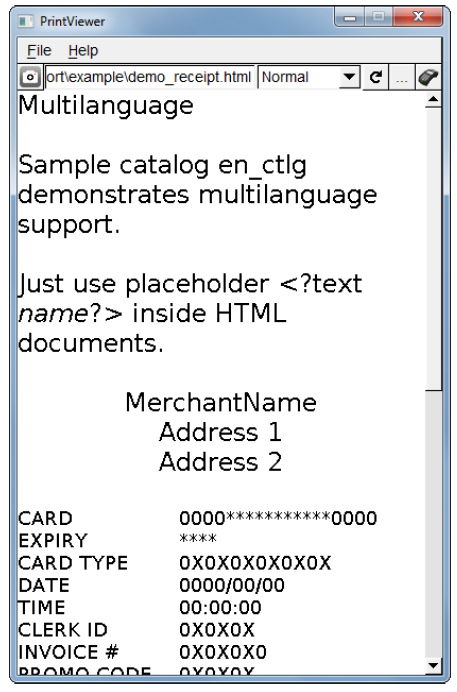
Print Viewer is available for Windows 7 and CentOS 6.5. Other platforms have not been tested and are not supported.
Print Viewer is provided as ZIP file. Just unzip the file for installation. A Windows installer is not provided/required. If prt_viewer.exe does not start, installation if runtime libraries Microsoft Visual C++ 2008 SP1 Redistributable Package (x86) may be required. The installer is available here:
http://www.microsoft.com/de-de/download/details.aspx?id=5582
When the terminals are considered to use some non-standard fonts, these fonts have to be also installed also on the PC. Otherwise, the display of text in the viewer may be wrong.
The following table shows where to install fonts depending on the operating system.
| Windows | C:\Windows\Fonts |
| Mac OS | /Library/Fonts |
| CentOS | /usr/share/fonts |
This section describes various Print Viewer usage options.
Receipts in Print Viewer are based on HTML/CSS files with additional dynamic data being loaded from data (*.dat) files.
Some properties for a receipt can be set in a configuration (*.ini) file.
Multilanguage receipts are possible by using catalog (*.ctlg) files.
To load a configuration file, select File > Load Configuration File.
To load an HTML file, either click the "Load HTML" button on the main interface or select File > Load HTML file. Additionally you may type in the path to a file in the input box on the main interface and press the enter key.
Please also note that loading CSS files directly is currently not possible. These have to be specified in the configuration file (see explanations on section [stylesheet]) and are then automatically loaded (if existent) by Print Viewer.
The currently loaded receipt can be refreshed without having to select the corresponding HTML file again. To do so, either click the "Refresh" button on the main interface or select File > Refresh.
Receipts can be printed if a connected terminal is present. Click the appropriate button on the main interface to display the Connect dialog box. Simply enter the IP address of the respective terminal and either press the enter key or click “print” to print the currently loaded receipt.
A development terminal with installed ADK Printer system is required to print.
To switch between landscape and normal mode, use the dedicated drop-down menu.
It is also possible to save a receipt as PNG image file. To do so either click the "Snapshot" button on the main interface or select “Save as PNG” from the main menu. Print Viewer comes with some example receipts. These can be found in the example folder inside the zip-file.
Print Viewer can also be used by providing arguments on the command line interface.
The following CLI is supported:
If another instance of Print Viewer is found when using the CLI, the existing one will receive the supplied arguments and execute them. The newly created instance closes itself after passing the arguments.
This section explains the usage of the relevant files.
HTML files provide a static frame for any receipt. Additionally, they may contain XML processing instructions (e.g. <?var …?> to insert variable data).
To use a data file place it in the same directory as the HTML file you want to use it with and give it the same name but with the extension “.dat”.
Example on using data files in conjunction with HTML files:
Data files have the same format as INI files and can consist of the following sections:
[value] Section
This section contains the variables available for processing the HTML file. The variable name is used as key and the content is used as value in the section.
Example:
To reference the variable “mytext” in a HTML file, simply include the line
The value section might also specify data for <?foreach?> statements. See the following HTML example snippet with <?foreach ?> processing syntax.
HTML Example:
Corresponding DAT file entry:
[catalog] Section
The [catalog] section specifies a catalog file that can be used by the HTML file with XML processing instruction <?text …?>.
For more details on Multi-language support, see Multi Language Support.
Example:
Configuration files are used to set the various formatting properties of a receipt. If possible, Print Viewer automatically loads the most recently used configuration file on start-up.
Configuration files are just regular INI files and are comprised of the following sections:
[font] Section
This is used to specify a default font and font size.
Example:
[stylesheet] Section
This is currently the only way to set a CSS file to format the output of Print Viewer.
Example:
ADK Printer comes with a sample application that demonstrates system features and provides a starting point for application developers who use the printer.
ADK Printer is provided on different target platforms. The following sections describe how to use the ADK Printer sample application on these platforms. In addition, this chapter gives general information about required components to run ADK Printer (runtime libraries, installing fonts).
Refer to the various OS requirements below.
V/OS operating system with additional download packages for the following are required:
Optionally additional user font packages might be installed to use different true type fonts.
libvfiipc. For this reason a GUIPRT application should use the newest version of libvfiipc (at least version 1.4.0), which comes along with ADK components packages. Linking a GUI client application with static GUI library libvfiguiprt.a requires adding libvfiipc.a to the linker command as follows: <library path> means the path, where libraries of libvfiipc are located.Resource files have to be accessed from prtserver running as a different (system) user. This has to be considered when packaging resource files so that access rights for these files are set up appropriately.
The recommended way is to have a separate package for the resource files (i.e. directory “www”) and set group “system” when creating it:
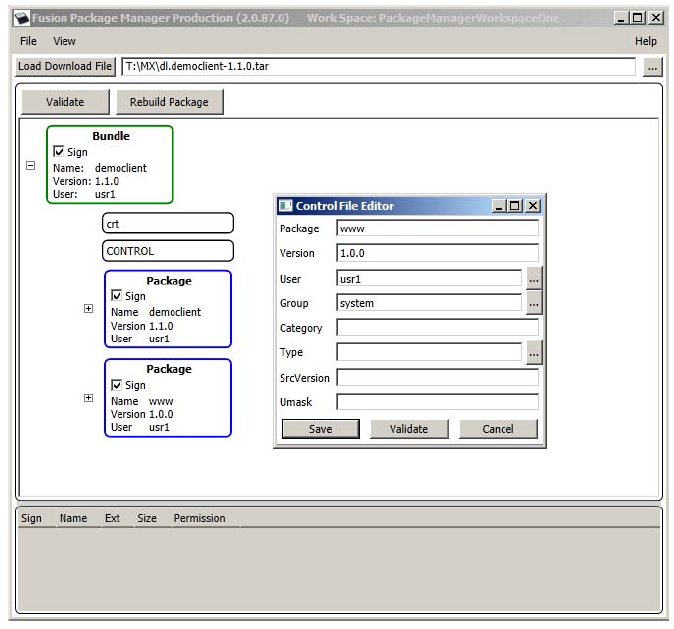
Providing fonts for the ADK Printer on V/OS requires the installation of a user font package containing font files in true type format (TTF). Detailed information on how to create user font packages can be found in the document “Fusion Secure Installer ERS”. An example user font package comes with the demo application in the documentation distribution package.
ADK Printer requires TTF font files and a special font index file called fonts.dir. These files must be added to the top level folder of the user font package. The file fonts.dir can be generated with Linux tools mkfontscale and mkfontdir, which are available on native Linux systems or Cygwin systems installed with X11 font utilities. Since version 1.5.0, the distribution packages of HTMLPrinter contains prt-font-utils-win32-X.X.X.zip with font tools mkfontscale.exe and mkfontdir.exe for Windows. The usage of the font tools and steps to create the fonts.dir file are described as follows:
mkfontscale (e.g. for Windows: C:\fonttools\mkfontscale.exe)mkfontdir (e.g. for Windows: C:\fonttools\mkfontdir.exe)The file contains a list of available fonts that are supported by the TTF files in the folder. The first line contains the number of font lines following below. Each font line represents a font variant, which is specified by parameters in the XLFD string (X Logical Font Description) that is appended to the font file name (with blank). The parameters in the XLFD string are separated by a ‘-‘ and contain information of supported font attributes like affinity, weight, and encoding. Please note that the second parameter “typeface family” (here: “dejavu sans”) must be used by application for:
For Verix operating system, no additional download packages with runtime libraries are required to make the ADK Printer service prtserver.out runnable. ADK Printer just depends on on-board libraries coming along with OS and the EOS. It is recommended always to use the newest OS and EOS versions available on Verifone DevNet. In addition, always the newest Verix SDK and EOSSDK should be used to build the ADK Printer client application in order to avoid incompatibility issues with the OS.
libvfiipc. For this reason a GUIPRT application should use the newest version of libvfiipc (at least version 1.7.2).libposix.so. For this reason a GUIPRT application should use the newest version of libposix (at least version 1.7.3).For building a ADK Printer client application, the developer has to consider the following mandatories:
libvfiprt.a requires adding svc_net.o, elog.o, libposix.a and libvfiipc.a to the linker command. Object files svc_net.o and elog.o are part of EOSSDK. Library libposix.a contains POSIX emulation functions for Verix, which the ADK Printer library libvfiprt.a depends on. Library libvfiprt.a comes along with the ADK Printer distribution package for Verix. prtserver.out and the import library libvfiprt.a were compiled with VRXCC compiler option –p to generate ARM11 optimized code. For this reason, an application must use the option –p for the VRXCC compiler and linker.libvfiguiprt.so) the compiler command line must contain the following define: <library path> means the path, where shared object libvfiguiprt.so is located.<library path> means the path, where shared object libvfiipc.so is located.libvfiguiprt.so requires shared POSIX library libposix.so. or this reason the following linker settings must be added to command line: <library path> means the path, where shared object libposix.so is located. For building a Verix system V shared library (VSL library) with a built-in ADK Printer client, the developer has to consider the following mandatories:
libvfiprt_vslpic.a and libvfiipc_vslpic.a for linking, which comes along with the ADK Printer distribution package for Verix. This library contains position independent code. In addition, the linker requires svc_net.o, elog.o, and libposix_vslpic.a to be added to the linker command for VSL library. Object files svc_net.o and elog.o are part of EOSSDK and must also be added for linking the application that uses the VSL library. Library libposix_vslpic.a contains the POSIX emulation for Verix. Please note to use the VSLPIC variant of this library as well. libvfiprt.a directly since building a shared object is more complex and linker will be able to remove unused code parts from the static library. For shared VSL libraries, the complete code is always added and no optimization is done by the linker.For building a Verix shared library (LIB library) with a built-in HTMLPrinter client, the developer has to consider the following mandatories:
libvfiprt_libpic.a and libvfiipc_libpic.a for VRXLIB command. The library comes with the ADK Printer distribution package for Verix and contains position independent code without C++ exception handling. In addition, the LIB library requires svc_net.o, elog.o and libposix_libpic.a to be added to the VRXLIB command. Object files svc_net.o and elog.o are part of EOSSDK and must also be added for linking the application that uses the LIB library. Library libposix_libpic.a contains the POSIX emulation for Verix. Please note to use the LIBPIC variant of this library as well. libvfiprt.a directly, since building a shared object is more complex and linker will be able to remove unused code parts from the static library. For shared VSL libraries, the complete code is always added and no optimization is done by the linker.Launching the HTMLPrinter:
It is recommended to download the ADK Printer server binary prtserver.out to the same group where ADK Printer client binary is located, since both tasks require access to environment variable LPD.
Since Verix operating system with environment variable *GO allows to run just one application task at startup, it is always necessary to start ADK Printer server (prtserver.out) by using function run() from a task that was started by *GO.
For instance, ADK Printer server could be started by:
“prtserver.out printdemo.out”) to environment variable *ARG.Providing fonts for ADK Printer on Verix requires the download of font files in true type format (TTF) and a font index file fonts.dir. Please refer to Installing Fonts on V/OS to get more information about font handling with file fonts.dir and how this file is created.
TTF font files and font index file fonts.dir must be downloaded to folder fonts on drive F: (group 15): F:15/fonts.
The demo application that comes with the documentation distribution package provides a sample download file vrxdemo.ddl for fonts.
This chapter presents troubleshooting guidelines on various ADK Printer system issues.
Since version 1.4.0, ADK Printer supports the activation of logging messages for diagnostics and problem analyses. On both platforms, Verix eVo and V/OS logging messages are enabled by setting environment variable PRT_LOGMASK. The variable is defined as a bitmask consisting of following decimal values:
Default value for PRT_LOGMASK is 0 and no logging outputs are activated as default. LOG_EMERG represents the lowest logging level, which only generates messages, if ADK Printer cannot be started or is not working at all. The highest level LOG_DEBUG will produce many messages of low-level I/O routines and should only be enabled for debugging purposes. For first analyses it is recommended to set LOG_ERR, which will provide information about error conditions, e.g. wrong resource or image paths, communications problems between printer server and client. In addition, LOG_INFO can be activated to display all communication data (JSON messages) between application and the printer server.
The environment variable PRT_LOGMASK can be used for the following printer components:
prtserver)libvfiprt)If one of the printer components reads PRT_LOGMASK at startup, it generates logging messages to an output channel that depends on the operating system used:
libvfiprt must add elog.o to the linker command and -l ELOG.LIB=N:/ELOG.LIB to the command line of the VRXHDR utility. Please note that EOSLog library requires to set environment variable *DEBUG=1, before any outputs are sent out to COM port. Both *DEBUG and PRT_LOGMASK can be set with DDL download tool or directly in parameter menu of Verix Terminal Manager.PRT_LOGMASK must be set in V/OS installation package (details for setting environment variables can be found in Secure Installer Documentation). The easiest way is to set the variable in start file of ADK Printer client application as follows:A logging message consists of several fields and the content is similar on both platforms:
Verix eVo:

V/OS:

timestamp:
The timestamp format is <seconds>.<milliseconds>. The value represents the time since beginning of capture (startup of UI component).
log prefix, log channel:
Since version 2.0.0 DirectGUI and ADK Printer server were combined to one server component and the logging message format has changed. Former field “logging component” was replaced by “log prefix” and this field is no longer used to identify the component. The field now is set to GUIPRT for both combined services to specify the system including all components of DirectGUI and HTMLPrinter. For identification of the specific subcomponent the new field “log channel” was introduced to identify logging outputs for the following components:
GUI: DirectGUI server (guiserver) or GUI related module in combined guiprtserverPRT: HTMLPrinter server (prtserver) or HTMLPrinter related module in combined guiprtserverGUIPRT: shared module in combined guiprtserverGUI: DirectGUI server (guiserver) or GUI related module in combined guiprtserverGUICL: Remote GUI library, UI clientPRTCL: Remote HTMLPrinter library, printer clientOn older Verix OS (QTxxx112, QTxxx108 and lower) each allocation/cleanup of dynamic memory with malloc() / free() and new / delete takes a lot of time, which causes the ADK Printer to run much slower than on V/OS. Newer OS versions (since QTxxx120) come along with a dynamic heap memory management, which increases the performance of ADK Printer significantly. It is highly recommended to run ADK Printer on newer OS versions on Verix.
In addition, since version 1.4.0, the ADK Printer supports activation of fast memory cleanup with free() and delete (for more details refer to Verix SDK documentation of function setFree()). The fast memory cleanup mode disables free() to validate the pointer before the memory is freed, which causes a significant performance improvement for free() calls. The activation of fast memory cleanup is enabled for ADK Printer service (prtserver) as default. ADK Printer import library (libvfiprt.a) does NOT call setFree() and it is up to application to enable fast free() mode as well. Verix applications may enable fast memory cleanup by calling setFree() in main() as follows:
Please note that setFree() is only supported by newer SDKs (since 03.08.01) and newer Verix OS (since QTxxx120) and it depends on used Verix OS, if prtserver is able to activate this feature.
If an application allocates a huge amount of memory (e.g. by using big images or scaling up an image to arbitrary size), the ADK Printer service (prtserver) may run out of resources and is terminated by the OOM killer of system (OOM=out of memory), if V/OS is not able to provide this memory.
In this case one of following messages may appear in console:
or
V/OS is configured to use overcommitted memory. This means that when malloc() or new operator return non-NULL, there is no guarantee that the memory really is available. In case it turns out that the system is out of memory, the process is killed by the OOM killer of the system.
For new and new[] operators, a possible way to detect the OOM during runtime is by catching exception bad_alloc as follows:
This would imply that all components (even OS libraries the prtserver is using) would implement such mechanism.
malloc().In summary there is no chance to avoid OOM kills at all, unless V/OS is changed to use overcommitted memory. The only way to avoid OOM kills is to reduce usage of dynamic memory (e.g. by using smaller images).
Former versions of ADK Printer service used a fixed limit of 2 MB to support even older Verix OS versions. This default was a trap for applications with higher requirements on the ADK Printer, since the fixed limit was quickly reached, if an application has used huge HTML documents including CSS or scaled images. For this reason, since version 1.7.0, the heap size of ADK Printer service (prtserver.out) is set to 0, which means an unlimited heap size. With the unlimited heap size ADK Printer is able to allocate memory as long as it is available in the system and memory allocation peaks (e.g. for loading images) do not cause the ADK Printer to crash by exceeding the fixed heap limit size.
Using an unlimited heap size requires the installation of a newer Verix OS supporting the dynamic heap management V1 or V2. The following table shows an overview of platforms and Verix OS versions providing the dynamic heap management:
Table: Platforms and OS Versions with Heap Management Scheme
| Platform | OS Version | Heap Management Scheme |
|---|---|---|
| Vx520 | QT520109, QT520110, QT520111, QT520112 | Dynamic Heap V1 |
| Vx520 | QT520108, and earlier | No Dynamic Heap |
| Vx520 | QT520120, and later | Dynamic Heap V2 |
| Vx520 GPRS | QT5G0109, QT5G0110, QT5G0111 | Dynamic Heap V1 |
| Vx520 GPRS | QT5G0106, and earlier | No Dynamic Heap |
| Vx520 GPRS | QT5G0120, and later | Dynamic Heap V2 |
| Vx675 | QT650104, and earlier | No Dynamic Heap |
| Vx675 | QT650120, and later | Dynamic Heap V2 |
| Vx680 | QT680109, and earlier | No Dynamic Heap |
| Vx680 | QT680110, QT680111 | Dynamic Heap V1 |
| Vx680 | QT680120, and later | Dynamic Heap V2 |
| Vx680 3G | QT6G0109 | Dynamic Heap V1 |
| Vx680 3G | QT6G0120, and later | Dynamic Heap V2 |
| Vx680 BT/WiFi | QT6B0105 | No Dynamic Heap |
| Vx680 BT/WiFi | QT6B0110, QT6B0111 | Dynamic Heap V1 |
| Vx680 BT/WiFi | QT6B0120, and later | Dynamic Heap V2 |
| Vx680 CDMA | QT6C0110 | Dynamic Heap V1 |
| Vx805 | QT850109, QT850110 | Dynamic Heap V1 |
| Vx805 | QT850120, and later | Dynamic Heap V2 |
| Vx820 | QT820109, QT820110 | Dynamic Heap V1 |
| Vx820 | QT820120, and later | Dynamic Heap V2 |
| Vx825 | QT830109(QT00012J) | Dynamic Heap V1 |
| Vx825 | QT830120, and later | Dynamic Heap V2 |
| all | QTXXX240, and later | Dynamic Heap V2 |
In case of an OOM (out of memory) the application can do the following:
_heap_current() –> returns the current heap size of the process in bytes_heap_max() –> returns the maximum heap size that was required by the process at this pointWorkaround for older Verix OS versions:
If ADK Printer service with new default heap size of 0 is started on an older Verix OS not having a dynamic memory management, the prtserver.out crashes immediately with a system logging message similar to the following:
In order to avoid this crash on such older Verix OS versions, the user may patch the binary prtserver.out with VRXHDR tool to use fixed heap limit size. For instance, if an application requires ADK Printer service to use a maximal heap size of 5 MB, the VRXHDR tool can be called as follows:
Since version 1.6.0, ADK Printer service (prtserver.out) was optimized to increase the printing speed. In order to reach the maximal printing speed as default, ADK Printer service was removed a workaround to synchronize the output of graphical print data to the OS printer port. With older OS versions, this synchronization has avoided the crash of low level OS function write(), when ADK Printer wrote a huge amount of graphical data to fast. Newer OS versions (e.g. QTXXX120/QTXXX240) do not need this synchronization and allow to call write() with full speed, which brings a printing speed improvement about 10 %.
It is unknown which OS versions are affected by this bug exactly. Therefore, it is not possible for HTMLPrinter to check for OS version and activate this synchronization automatically. For older OS version, user may re-enable the synchronisation manually by setting the following environment variable: